Migration
Start here: get your kSLR reward.
Your SolarCoin is now called kSLR, waiting at the same address that held your SLR — 1,000 kSLR for every 1 SLR. It’s the same reward, just renamed and rescaled; your value hasn’t changed (500 SLR is now 500,000 kSLR — the same value, just counted in smaller units, like cents in a dollar). To receive it you claim it at the SolarCoin portal — signing in is how you start, and you collect it to your wallet from there (a couple of minutes). New to all this? Start with the Beginner’s Visual Guide.
No deadline pressure — your balance is already fixed and rewards stay open about a year. It takes only a couple of minutes if you sign in with email, so it’s worth doing now while you’re here.
Which holder are you?
Pick how you held your SolarCoin and see only the steps that apply to you.
A 10-second check — which line sounds like you?
- You have a crypto wallet you control (MetaMask, a hardware wallet, or a 12-word phrase) → the wallet path.
- You sign in with an email at claim.solarcoin.org, or you’re not sure you have a wallet → the email path.
Path 1
It’s in a wallet you control.
Whether you earned kSLR as monthly rewards or bought SolarCoin on a DEX, your reward is reserved for your wallet’s address on Base — but it isn’t sent automatically. You collect it at the SolarCoin portal: a quick, safe, one-time step that sends your kSLR to your wallet. It can never move your other funds or ask for your seed phrase.
Start here — collect your kSLR at the portal
Go to claim.solarcoin.org and sign in, open the Airdrop page, connect the wallet that held your SolarCoin (switch to the Base network if asked), and tap Collect. One transaction sends your kSLR to your wallet — you only pay a small Base network fee.
Open the claim portal →1.
Then add the token to see your balance
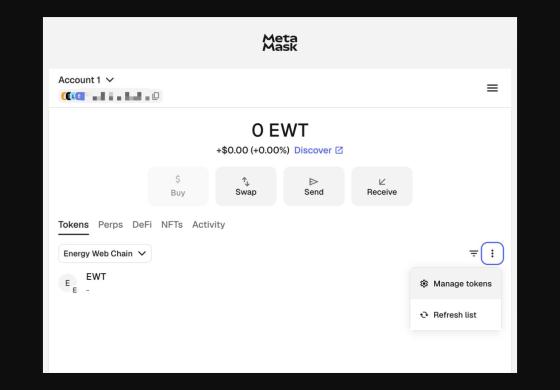
The easy way: click the button below — it switches MetaMask to the Base network and adds the token (it appears as KSLR).
Prefer to add it by hand? (advanced)
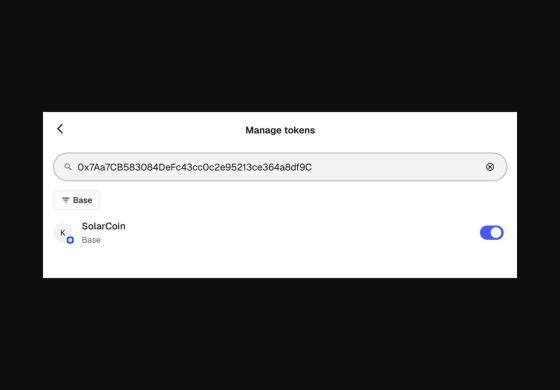
On the Base network (Chain ID 8453), open “Import tokens” and paste the official contract address:0x7Aa7CB583084DeFc43cc0c2e95213ce364a8df9C
Quickest safe check: the last four characters, …df9C.
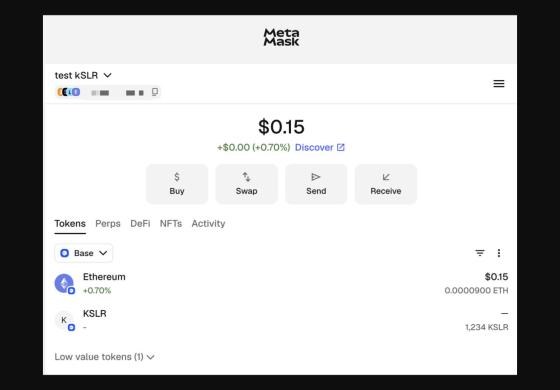
This only displays the token in your wallet — it never moves your funds and never asks for your secret phrase. In MetaMask it appears as KSLR (all caps); that’s normal.
On a phone? This button needs the MetaMask app — open this page inside MetaMask’s own browser (app menu → Browser), then tap it. In Safari or Chrome, use Copy contract address and paste it into MetaMask’s “Import tokens”.
What you’ll see next: MetaMask may ask to connect (tap Connect), then to switch to the Base network (tap Approve), then to add the token (tap Add). All safe — none can move your funds or reveal your seed phrase. Nothing happens? Make sure MetaMask is unlocked.
2.
Optional: confirm your balance on BaseScan
Already see a kSLR balance in your wallet? You’re done — this check is just for peace of mind. To do it: search your address on BaseScan; your kSLR should equal your snapshot SLR balance × 1,000.
3.
Keep earning
Future rewards will be issued as kSLR on Base.
Path 2
You sign in with an email.
If you earned SolarCoin through an SMA Sunny Portal account, your rewards are still recorded — even if you haven’t logged in for years. Your account is keyed to the email address you used back then with the SMA portal.
1.
Log in with your original email
The only official portal is claim.solarcoin.org — type it into your browser yourself and check the spelling; we’ll never send you a different link. (claim.solarcoin.org is part of solarcoin.org — a subdomain like this is normal and still us.) Sign in there — or recover access — using the email address that was tied to your original SMA Sunny Portal account and the forgot password / SMA user link. Signing in is how you claim — it starts your reward and shows your balance; we never ask for a password reset by message, and never for a seed phrase.
2.
Can’t get in? Use the help button
If your old email no longer works or you don’t remember which one you used, click the help button (the round chat bubble in the lower-right corner of the screen) of the Rewards Portal and send us the details listed such as your facility address, name, installation size and install date. We will never ask for passwords or seed phrases.
3.
Verify your balance and optionally you can add a wallet address
Once you’re in, check your reward balance (now denominated in kSLR) . You are good to go. Your future rewards will be visible here.
Optionally, you may add a Base wallet address so future rewards go directly to a wallet you control. The outstanding balance should be minted and sent to your kSLR address on the next monthly reward issuance cycle .The Beginner’s Visual Guide covers wallet setup from scratch. Take your time. Your reward isn’t going anywhere.
What to include in your help request
Open claim.solarcoin.org, click the help button — the round chat bubble in the lower-right corner — and include:
- The email address linked to your old SolarCoin / SMA account
- Your current email address, if different
- Your Claim ID, if you know it
- Anything else that helps us find your account (installation name, installation address, Nameplate capacity, country, approximate signup year)
Never share passwords or seed phrases — we will never ask for them, and we will never message you first on social media or by DM. If someone does, it is a scam. Can’t reach the portal? Email support@solarcoin.org with the same details.
Still not sure which path is yours?
Read the full migration guide, browse the FAQ, or email support@solarcoin.org — include your Claim ID if you have one. And if anything on your screen ever looks different from these instructions, don’t guess — pause and email us first.